The Site List shows every website you can sell, one row per domain, at the publisher price: what the order costs before your margin. When the same domain is offered by more than one publisher, you see the cheapest one.
These are your buying prices. Never send this page or a screenshot of it to a client. To share prices, use List for client or your public link, which add your margin.
1 Search for a website
Click Site List in the menu and type part of a domain in the search box. Results update as you type. https:// and www. are ignored, so you can paste a full address.

A search for “demo-”. Each row shows the category, DA, DR, spam score, traffic, prices and posting time.
| Column | Meaning |
|---|---|
| DA / DR | Moz Domain Authority and Ahrefs Domain Rating. |
| Spam | Moz spam score. Lower is better. |
| Traffic | Monthly visitors. |
| Price | Publisher price for a general guest post. |
| Casino / Insertion | Publisher price for casino content or a link insertion. No means the website doesn't accept it. |
| Posting | Usual time to publish, in hours. |
2 Filter the list
- Category: the website's topic.
- Price: from and to, in US dollars.
- DA / DR: minimum and maximum, 0 to 100.
- Traffic: you can type
2kor1m. - Spam: 0% up to 20% or less.
- More: posting time (within 24 hours, 48 hours, 72 hours or a week), and only websites that accept casino or link insertions.
Click a column header to sort. Reset clears every filter. Use Show to list up to 1,000 rows per page.
3 Check many websites at once
A client sends you a list and asks which ones you can do? Click Bulk search, paste the domains (one per line, or separated by commas or spaces) and click Search list. Up to 5,000 domains at a time.
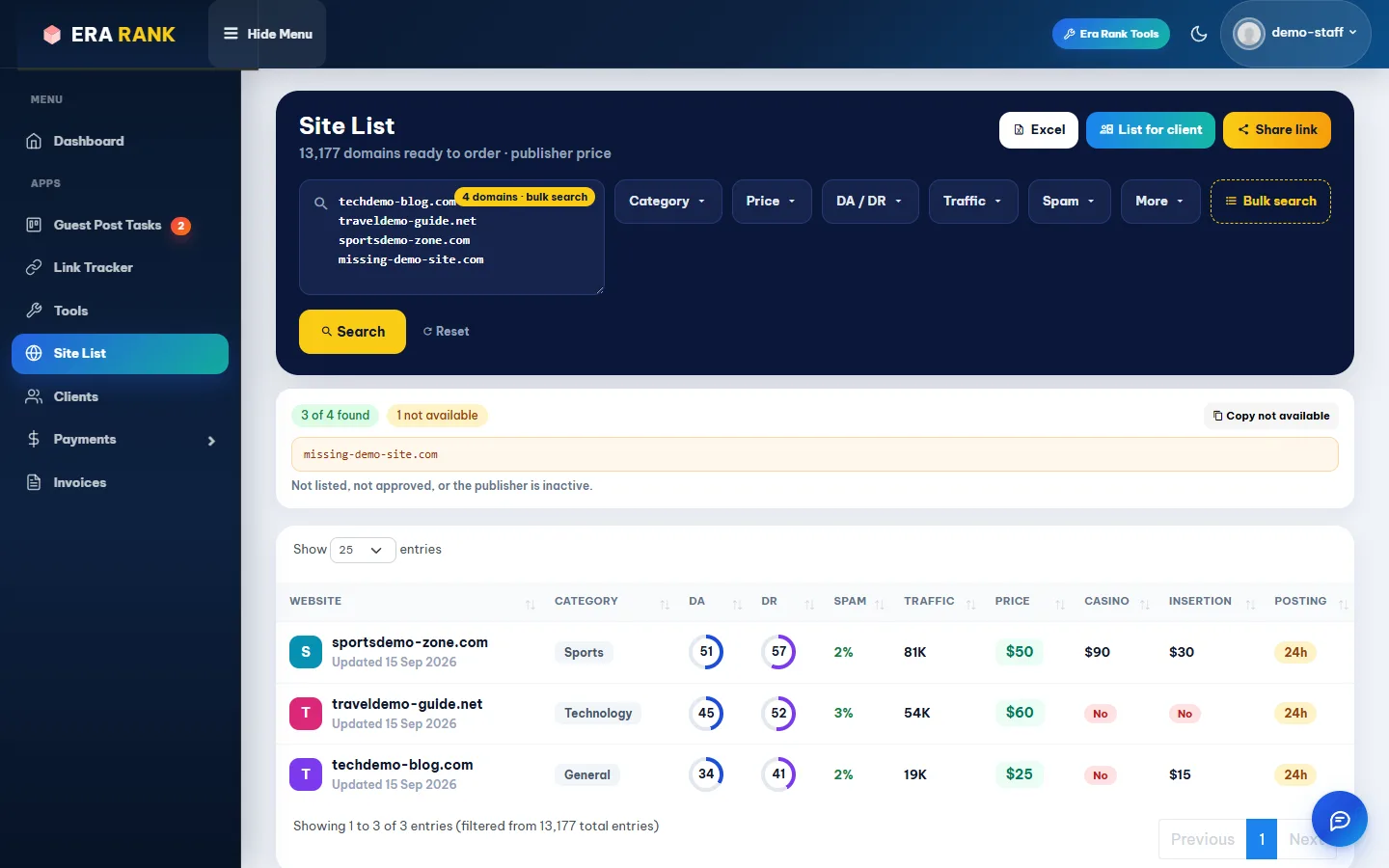
Three of four found. The one that isn't available is listed, with a button to copy it.
A domain is “not available” when nobody lists it, it isn't approved, or its publisher is inactive.
4 Excel
Excel downloads the full list of approved websites at publisher prices, for your own use. It includes every listing, not only the rows your filters show.